Strong Pro: Unlocking the Power of Brushed Urban Typography
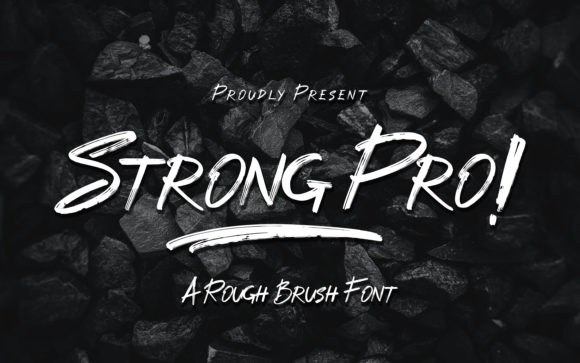
If you are looking to inject a sense of raw energy and modern adventure into your next project, Strong Pro stands out as a definitive choice. This is not merely another sans-serif typeface; it is a display font that brings a distinct, textured personality to the table. With its brushed and rough aesthetic, it captures the essence of urban culture, street art, and contemporary design trends. However, just because a font looks incredible in a preview does not mean it will perform perfectly in your final output. Many designers, from freelancers to small business owners, rush to apply bold fonts without considering the nuances of their application.
The appeal of Strong Pro lies in its ability to transform casual designs into impactful visual statements. Whether you are creating a logo for a skate shop, a poster for a music festival, or social media graphics for a lifestyle brand, this font offers a rugged charm that standard geometric fonts simply cannot replicate. Yet, to get the most out of it, you must understand how to wield it correctly. Using a display font like this requires a shift in mindset from traditional typesetting to more expressive, artistic composition.
Common Pitfalls When Adopting Strong Pro
One of the most frequent mistakes I see when creators download a new font is assuming that "bold" automatically means "readable." While Strong Pro is designed to be striking, its rough texture and heavy strokes can quickly become illegible if used improperly. A common error is attempting to set long paragraphs of body text with this typeface. The brushed edges and irregularities that give the font its character can cause eye strain and reduce reading speed when applied to large blocks of copy. This often leads to a poor user experience, where your audience disengages before they even finish reading your message.
Another significant oversight involves ignoring the context of the design. Because Strong Pro has such a strong voice, it can easily overpower other elements on the page. Beginners often pair it with equally aggressive fonts or busy backgrounds, resulting in a chaotic visual hierarchy. When every element screams for attention, nothing gets heard. This mistake affects the overall quality and professional presentation of your work, making it look amateurish rather than edgy.
There is also the issue of resolution and scaling. Display fonts with high levels of texture rely heavily on vector precision to maintain their integrity. If you scale Strong Pro down too much for a mobile interface or a small icon, the rough details may disappear or turn into muddy blobs. Conversely, printing this font at a low DPI can make the "brushed" look appear pixelated and jagged, ruining the intended smooth yet rough aesthetic. These technical oversights can lead to wasted resources on reprints or redesigns.
How Mistakes Impact Your Results
When typography fails to communicate effectively, the consequences ripple through your entire project. If your headline is difficult to read due to improper spacing or size, you lose the opportunity to grab attention immediately. In marketing and branding, this translates directly to lost engagement and lower conversion rates. Furthermore, using a font in an inappropriate context can dilute your brand identity. For instance, a financial institution using Strong Pro for all their communications might inadvertently signal instability or lack of professionalism, confusing their target audience.
Efficiency is another area affected by these errors. Spending hours tweaking kerning pairs that don't work or trying to force a display font into body text roles wastes valuable time. It is far better to invest that time upfront in understanding the font's limitations and strengths. Satisfaction drops when clients or stakeholders receive a design that looks great on screen but falls apart in print, or when the message is obscured by the style itself.
Best Practices for Applying Strong Pro
To avoid these pitfalls, start by defining the role of the font in your design. Treat Strong Pro as a headline or a display element, not a body text solution. Use it sparingly to create focal points. Pair it with clean, neutral sans-serifs or simple serifs for supporting text. This contrast allows the unique texture of Strong Pro to shine without competing with the information you need to convey. Think of it as the main course; you wouldn't serve it with a side dish that has an equally strong flavor profile.
Kerning and tracking are critical when working with textured fonts. The irregular shapes of the letters in Strong Pro can create uneven white space between characters. You must manually adjust these spaces to ensure a balanced look. Don't rely solely on automatic kerning settings. Take the time to zoom in and inspect the gaps, particularly around the sharp angles and rough edges. Proper spacing enhances readability and elevates the perceived quality of your design.
Consider your medium before downloading or purchasing. If your primary use case is digital web design, ensure the font supports various weights and has good hinting for smaller sizes. If you plan to print merchandise like t-shirts or posters, check the file format for compatibility with your printing software. High-resolution files are essential to capture the fine details of the brush strokes. Always test your design at 100% scale to verify that the texture holds up under scrutiny.
Evaluating Before You Commit
Before integrating Strong Pro into a client project or a personal portfolio, run a quick evaluation checklist. Does the font match the tone of the brand? Is there enough contrast between the font and the background? Will it remain legible across different devices and print sizes? Asking these questions helps prevent costly mistakes later. It is also wise to review the licensing terms carefully. Some display fonts have restrictions on commercial use or number of impressions, which could affect your budget and legal standing.
Finally, embrace experimentation. The beauty of Strong Pro is its versatility within the urban and adventurous niche. Try using it in all caps for maximum impact, or mix it with lowercase letters for a more dynamic feel. Play with color gradients or textures behind the text to enhance the brushed effect. By approaching the font with a strategic mindset and a focus on usability, you can leverage its unique characteristics to create designs that are both visually stunning and functionally effective.
In summary, Strong Pro is a powerful tool for anyone looking to add a modern, gritty edge to their work. By avoiding the trap of overuse, paying attention to technical details, and respecting the balance of your design, you can ensure that your projects stand out for the right reasons. Remember, the best typography is invisible; it serves the message while adding a layer of style that resonates with your audience.